The showcase / APFN

Work, built
over the years.

A collection of mobile apps, web applications, and websites. Different challenges, different platforms — the same care in how they’re built.

Mobile apps Web apps Websites

Explore the work

01 / The collection

Across screens. Over time.

2 projects shown for All work.

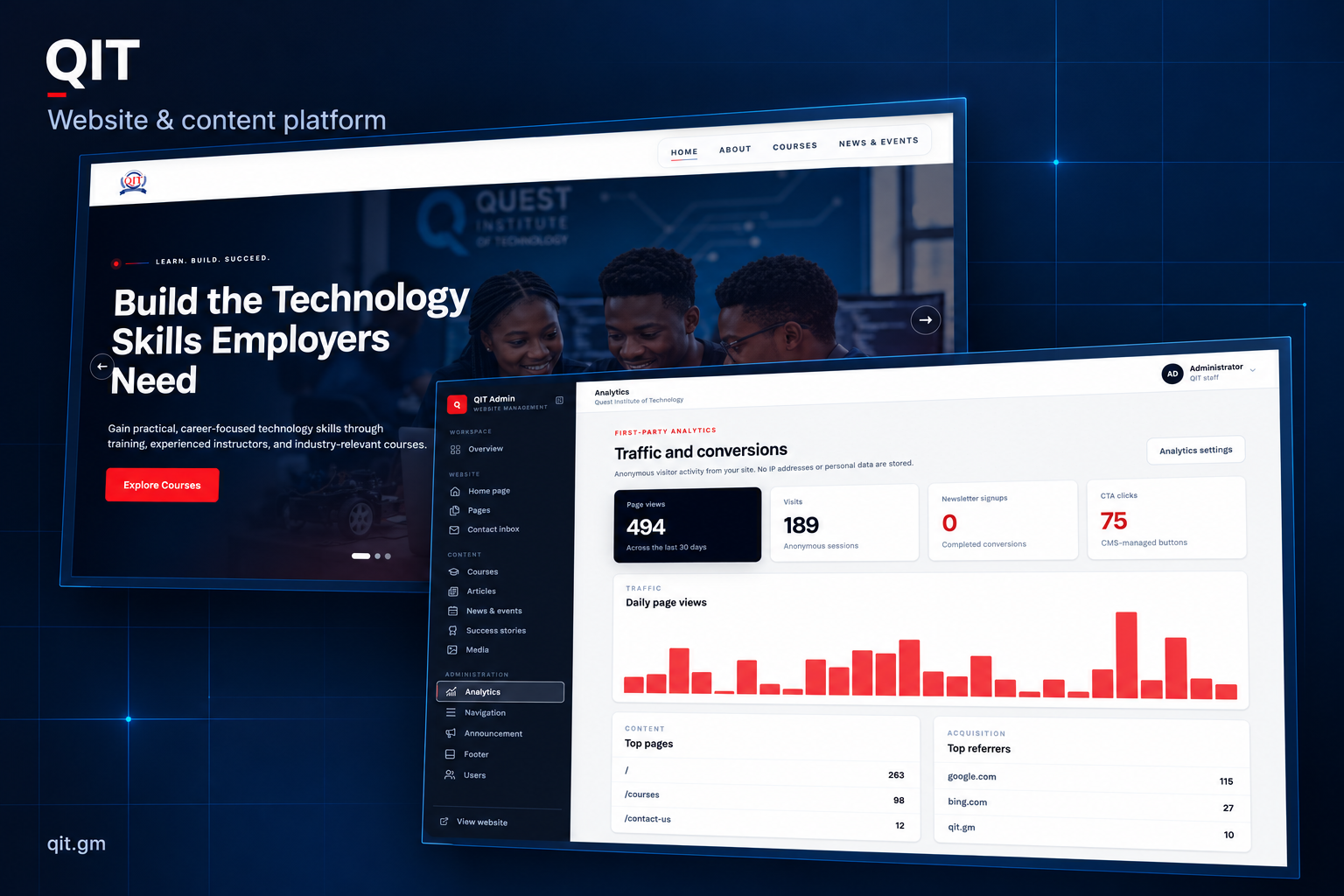
QIT showcase banner combining its public homepage and the supplied admin analytics screen on a navy background.

Website

Quest Institute of Technology

A public-facing website and content management platform for Quest Institute of Technology — connecting the student experience with the tools behind the scenes.

Independent project · 2 weeks

My role / Design & full development
Visit website
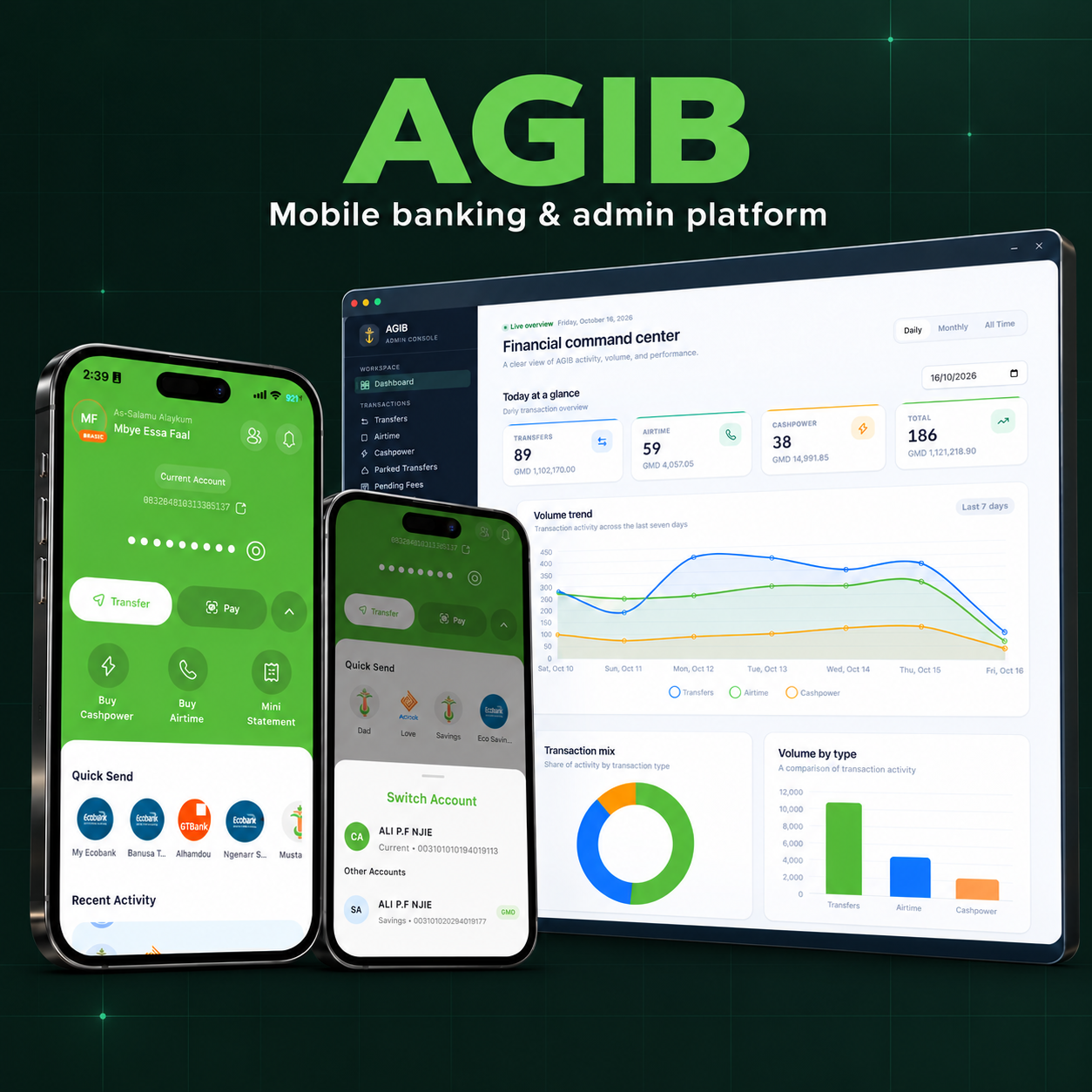
AGIB mobile banking screens and administrative dashboard on a dark forest-green grid background.

Mobile app

AGIB Mobile Banking

A mobile banking experience and administrative platform, connecting everyday account management and payments with operational oversight.

Third-party contract through employment · 4 months

My role / Design & full development

View on Google Play

Next / Your project

Let’s build something worth showing.

Have a mobile app, web platform, or website in mind? Tell me what you’re working on.

Discuss your project

Inside the project / qit

Project story

Quest Institute of Technology

A public-facing website and content management platform for Quest Institute of Technology — connecting the student experience with the tools behind the scenes.

Delivery duration
2 weeks
My role
Design & full development

The challenge

Help prospective students find courses and institute information while giving staff a dedicated way to manage the website.

What the platform delivers

A public course-discovery website paired with content, media, and site-activity tools in an administrative workspace.

Engagement / Independent project

QIT showcase banner combining its public homepage and the supplied admin analytics screen on a navy background.

01 / Overview

The bigger picture.

QIT brings together two sides of an education website: a public space for prospective learners to discover the institute, and an administrative workspace for managing its online presence. Clear information for visitors is paired with organised content tools and a view of site activity for the team behind it.

  • Public website
  • Content management
  • Courses & articles
  • Media library
  • First-party analytics

02 / Process & decisions

How the pieces come together.

  1. Structure the public experience

    The public navigation centres on the institute, its courses, and news and events. The homepage introduces the learning offer and gives prospective students a direct route into course discovery. This keeps the first visit focused on understanding what QIT offers and where to go next.

  2. Organise the editorial workspace

    The admin separates website pages from recurring content such as courses, articles, news, and success stories. Media, navigation, announcements, and footer settings have their own places. This structure connects the public-facing experience with a dedicated workspace for the people maintaining it.

  3. Make site activity understandable

    The analytics view brings page views, visits, newsletter signups, and calls to action into one overview. A daily activity chart and tables for pages and referrers add context. Grouping these signals makes it possible to look beyond overall traffic and see which content and entry points visitors use.

  4. Connect discovery with ongoing management

    The public site supports discovering the institute and its learning opportunities, while the admin supports maintaining content and reviewing activity. Together, the two interfaces show the wider platform behind a website: both the visitor experience and the work needed to keep it current.

03 / A closer look

QIT public homepage introducing its technology training with a course exploration link.
Public website — introducing the institute and creating a clear route into course discovery.
QIT admin analytics screen showing activity cards, a daily page-view chart, and content management navigation.
Behind the scenes — a dedicated workspace for content management and first-party analytics.
Visit live project